Compact Z-Shaped Desk with Monitor Shelf for Small Rooms
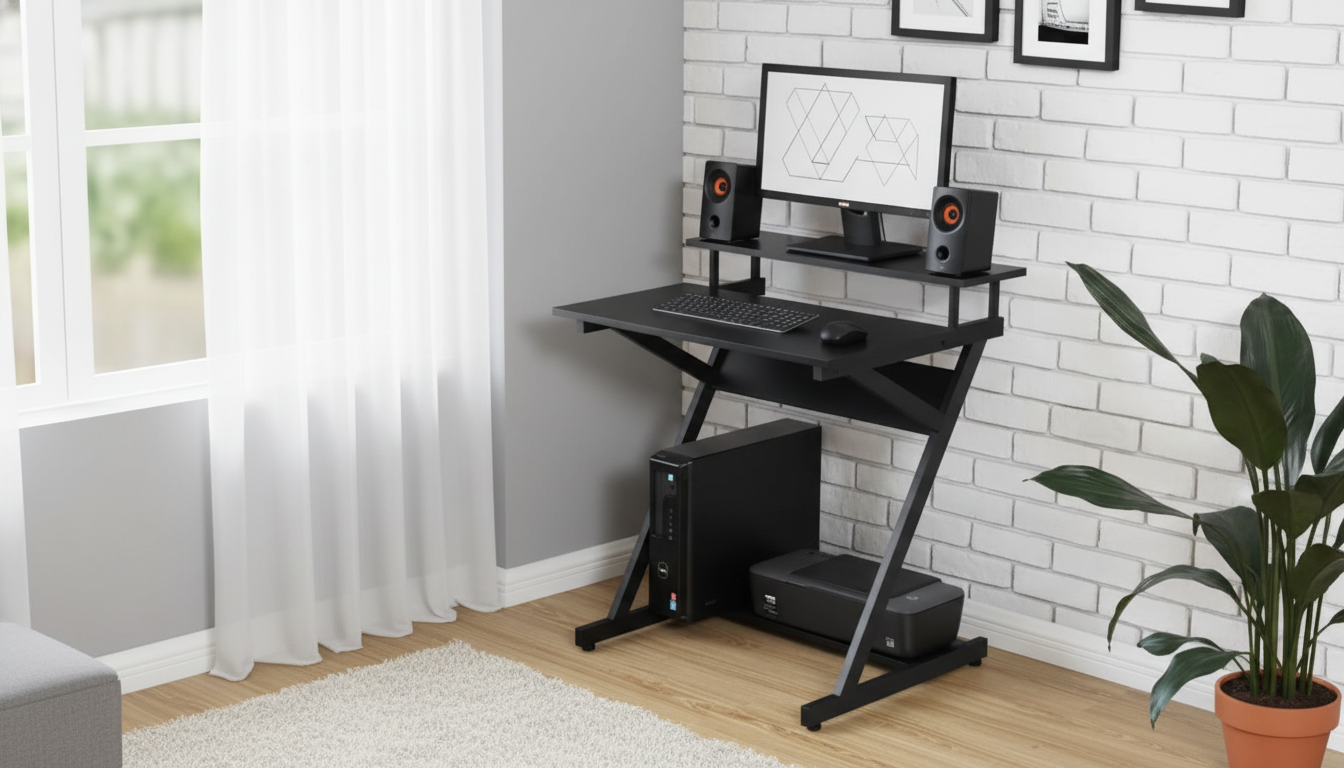
Compact Modern Z-Shaped Computer Desk with Monitor Shelf for Small Spaces
A small-space workstation works best when it keeps the screen at a comfortable height, leaves legroom, and stays stable without feeling bulky. A Z-shaped frame brings a modern look while helping the desk feel light and open, and a monitor shelf can free up valuable desktop space for writing, peripherals, or a laptop stand. If you’re building a tidy setup in a bedroom corner, studio apartment, or dorm, this style of desk can make the room feel more workable without taking over the floor plan.
What Makes a Z-Shaped Desk a Smart Fit for Tight Rooms
A Z-shaped computer desk is popular for small spaces because it looks “airier” than a traditional boxed-in frame while still feeling intentional and modern. The angled supports create a streamlined profile that visually takes up less room—helpful when your workspace shares space with a bed, sofa, or dining area.
- Modern, lighter silhouette: Angled legs and an open frame reduce the heavy look of blocky desks.
- Open sides for easier movement: Sliding a chair in and out feels less restricted, especially in narrow walkways.
- Flexible placement: Works well in multipurpose rooms like bedroom corners, studio apartments, and dorms.
- Simple cable setups: Compact desks pair well with minimal cable runs and smaller task lights.
Why a Monitor Shelf Changes the Way the Desk Works
A monitor shelf can be the difference between a desk that feels cramped and a desk that feels organized. By elevating the screen, you’re able to reserve the main desktop for the items you actively use—keyboard, mouse, notebook, or a small drawing tablet—without constantly shuffling things around.
- More comfortable viewing height: Raising the monitor closer to eye level helps reduce neck bending during long sessions.
- Clear zones: The shelf becomes the monitor “home,” keeping the lower surface open for active work.
- Useful under-shelf storage: Depending on clearance, the area beneath can hold a keyboard, journal, or compact speakers.
- Cleaner layout: Separating “screen on top, work below” makes small desks feel larger.
For more guidance on workstation comfort, the OSHA Computer Workstations eTool and Cornell University ergonomics resources outline practical monitor and posture basics that apply even to compact setups.
Quick Specs and Everyday Use
This desk style is typically designed for compact, modern setups—think a laptop plus one monitor, or a single-monitor desktop with a streamlined keyboard and mouse. The Z-frame and elevated shelf also suit gaming essentials when you want a clean, dedicated spot for the display and an open surface for quick movements.
- Best for compact gear: Laptop + monitor or a single monitor setup.
- Modern design match: Blends easily with contemporary and minimalist interiors.
- Better desktop flow: Shelf-supported layouts keep the main surface more usable.
- Chair-friendly footprint: Works well with armless or slim task chairs that can tuck in.
At-a-glance checklist for a small-space desk setup
| Need | What to look for | Why it matters in a small space |
|---|---|---|
| Monitor comfort | Monitor shelf or riser with stable platform | Helps keep screen at a better height without extra furniture |
| Desktop capacity | Room for mouse movement + writing area | Prevents crowding and keeps essentials within reach |
| Legroom | Open frame with minimal crossbars | Improves comfort and allows flexible seating positions |
| Cable control | Simple routing path along rear edge | Reduces visual clutter and tripping hazards |
| Stability | Rigid frame + level feet (if available) | Stops wobble on hard floors and rugs |
Placement Ideas That Save Space
Where you put the desk matters as much as the desk itself. A few small placement tweaks can help your room feel more open while making the workstation easier to use every day.
Setup Tips for Comfort and a Cleaner Desktop
A Compact Option to Consider
If the goal is a streamlined workstation that keeps your screen elevated while preserving desktop space, the Compact Modern Z-Shaped Computer Desk with Monitor Shelf for Small Spaces is designed specifically for that balance. It’s a practical fit for apartments, dorm rooms, bedrooms, and minimalist work-from-home stations—especially when you prefer a clean layout with a clear division between display and work surface.
To keep the area visually calm, pair the desk with a simple storage routine. A quick way to stay consistent is a printable guide like Storage Hacks to Reduce Visual Clutter (Printable Checklist), which can help you decide what stays on the desk and what gets stored away.
When to Choose a Larger Desk Instead
For those scenarios, consider stepping up to a fuller-size option like the 62″ Executive Desk with Double Pedestal and Natural Wood Top, which is better suited to wider layouts and storage-forward workstations.
FAQ
Will a monitor shelf make the screen too high?
It depends on your chair height and monitor size. A good target is to have the top of the screen near eye level; if it feels high, lower your chair (if possible), tilt the monitor slightly, or use a smaller riser/stand solution on the shelf.
Is a Z-shaped desk stable enough for daily work and typing?
Stability mainly comes from a rigid frame, correct assembly, and even contact with the floor. After setup, recheck and tighten screws, and use levelers or furniture pads if the desk sits on uneven flooring or a thick rug.
What size chair works best with a compact desk for small spaces?
Armless or slim task chairs usually fit best because they tuck in easily and don’t crowd walkways. Choose a seat height that allows your elbows to rest around a 90-degree angle when typing, and confirm the chair can slide under the desk when not in use.











Leave a comment